RV Parks & Campgrounds
- 4.4
- Rating
- 500.00K
- Installs
- Free
- Price
 Analysis by App-foxy
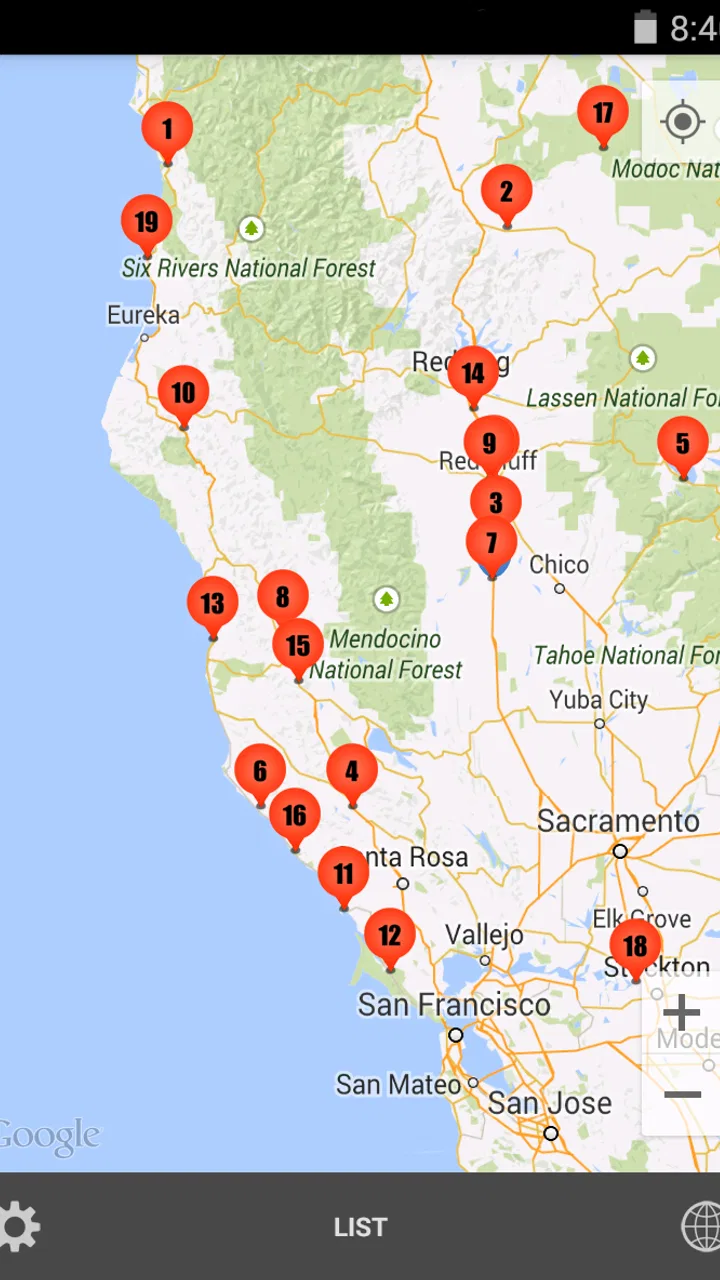
When I plan an RV trip, the hardest part is often not choosing a destination but finding a practical place to stop along the way. RV Parks & Campgrounds is built for that exact problem: it is a Travel & Local app from ParkAdvisor that helps me search through RV parks, campgrounds, rest areas, gas stations, and stores while I am shaping a route. I found it most useful as a trip-planning companion rather than as a complete navigation replacement.
The app is free, suitable for Everyone, and has reached over 500 thousand installs. Its average rating is 4.4 from around 9 thousand ratings, with roughly 4 thousand written reviews, which suggests that it has become a familiar tool for a meaningful group of RV travelers. The current version is 4.4.9, and it supports older Android devices starting with Android 4.1, so it may appeal to people keeping an older phone or tablet in their vehicle.
How connectivity changes the usefulness of the app
The central thing to understand is that this app is most helpful when the phone can communicate with its online services. Searching for a place, checking the surrounding options, and deciding whether a stop fits my route are all activities I prefer to do while I have a stable connection. That makes the app feel less like a self-contained road atlas and more like a connected directory for making decisions during a journey.
You May Also Like

 Blood Strike: 2.5 Anniversary
Blood Strike’s Loadouts Turn Every Drop Into a Tactical Gamble
A close look at Blood Strike’s custom loadouts: how fast access to signature weapons reshapes its battle royale rhythm, rewards preparation, and narrows the gap between fights.

 Pandora - Music & Podcasts
Pandora’s Music Is Easy to Start, but Harder to Recover
Pandora’s strength is its low-effort path from a seed to a station. Its weak spot is how much confidence it asks you to place in connection, setup, and quiet recovery.

 8 Ball Pool
8 Ball Pool Is Built on Rivalries, Rematches, and Routine
A close look at the rivalries, rematches, shared routines, and unanswered safety questions that turn a quick pool match into a persistent mobile community.

 Samsung Music
Samsung Music’s Quiet Strength Is Playing What You Already Own
Its reach comes less from spectacle than from dependable access to a personal library. That simplicity is both the app’s strongest retention engine and its ceiling.

 AccuWeather: Weather Radar
AccuWeather Review: A Quick, Clear Forecast for Everyday Decisions
For everyday plans, the best forecast is the one you can understand quickly. AccuWeather makes rain timing, radar, and local conditions easy to act on, with a few trade-offs.

 Hill Climb Racing
Why Hill Climb Racing Still Turns Crashes Into One More Run
A tiny car, a bumpy hill and one more upgrade: Hill Climb Racing keeps resurfacing because its simple chaos makes every near-miss feel personal.
More From Our News Desk



That distinction matters in an RV. A campsite search is rarely a one-tap decision. I may need to compare several locations, look for fuel before a long stretch, identify a rest area for a break, or find a store near a campground. Having those categories together is more convenient than jumping between a general map, a campground directory, and a separate fuel-finder. The convenience is strongest before departure, when I can investigate a route calmly instead of searching while driving.
I would not treat a search result as an automatic guarantee that a site is suitable. An RV park can appear useful on a map and still be a poor match for a long vehicle, a particular rig setup, or a travel schedule. I use the app to create a shortlist, then check the practical details that matter to my trip through the available listing information or by contacting the location when necessary. That extra step is important because a map entry cannot replace current confirmation.
Planning before leaving home
The best workflow I found is to use the app while connected to reliable Wi-Fi before setting off. I start with the broad route, identify likely overnight areas, and then inspect nearby alternatives rather than choosing the first result. This helps me think in terms of stages: where I might stop for fuel, where I could rest, and which campground area gives me a sensible backup if the first choice does not work.
A useful but easy-to-miss habit is to search for support locations around a campground, not only campgrounds along the highway. A gas station or store can change the practicality of an otherwise attractive stop. For example, a remote campsite may be fine if I know where to refuel and buy supplies beforehand, while a more central park may be easier for a short stay when I need groceries or equipment. The app’s mix of location types makes that comparison possible without rebuilding the entire search in another tool.
I also prefer to make a small written note of the places I am considering. I record the name, approximate position, and why it is useful, such as being near fuel or offering a reasonable stopping point. This is not a criticism of the app; it is a sensible response to travel conditions. A phone can lose signal, a battery can run low, and a route can change quickly. A simple backup list makes the connected search more valuable because I am not depending on one live moment later.
Using it from the passenger seat
On the road, the app works best when a passenger handles it. The passenger can compare nearby options, review the route, and help decide whether a stop is worth the detour. If I am driving alone, I use it only when safely parked. Searching for a campground or rest area while moving is not worth the distraction, especially with a larger vehicle that needs more time and space to maneuver.
This passenger-seat use case is more practical than trying to make the app do everything. I keep my primary navigation tool responsible for turn-by-turn driving, while RV Parks & Campgrounds helps answer the broader question: what useful places are available around the route? That division of labor reduces confusion. A general map is usually stronger for navigation, while a specialized RV directory is more focused on the kinds of stops a recreational vehicle traveler actually needs.
Connectivity becomes especially important when I am approaching a decision point. If I have a signal, I can search again and adjust the plan based on how far I have driven, whether the next fuel stop is convenient, or whether a rest area is preferable to continuing. If the connection is weak, the experience becomes less predictable. I do not assume that a result I saw earlier will remain fully available in the same way once the phone is offline.
What happens when the signal fails
Rural routes create the most obvious limitation. Mountain roads, remote campgrounds, and long highway stretches can all produce moments where a connected directory is harder to use. The problem is not simply that a map may load slowly. A failed search can arrive precisely when I need a quick decision, such as finding fuel before the next isolated section or locating a safe place to stop for the night.
My solution is to move the important work earlier. Before leaving a connected area, I search the next part of the route and keep a few alternatives in mind. I also avoid waiting until the fuel gauge is low or daylight is nearly gone before looking for a campsite. That approach turns the app into a planning aid rather than an emergency rescue tool. It is a meaningful difference, and travelers who expect every result to be available at any moment should be aware of it.
When a search does not immediately help, I first check whether the issue is the network rather than the destination. I wait until the vehicle is stopped, try again in a stronger coverage area, and compare the result with my main navigation app or a saved note. If the listing still does not answer the practical question, I contact the campground or use its own current information. Recovery is easier when I have not made the app my only source of truth.
Another realistic failure is a last-minute change. A planned campground may be full, a road may be closed, or the group may decide to continue farther. In that situation, I use the app to generate alternatives by location type: another RV park for an overnight stay, a rest area for a short break, or a gas station before changing direction. This is one of its stronger recovery roles, provided I still have a connection and enough time to evaluate the options safely.
Keeping mobile use practical and data-conscious
Because the app is designed around finding places, repeated searching can become unnecessary if I keep reopening the same areas without a clear reason. I use Wi-Fi for the detailed planning session, then reserve mobile data for changes that matter. Searching only the next portion of the route, rather than repeatedly scanning an entire journey, is a simple way to keep the phone focused and reduce needless loading.
I also keep the phone charged before departure. That sounds obvious, but connectivity tools are only useful when the device is ready to search. In an RV, the phone may already be handling navigation, music, calls, and charging accessories. I prefer to connect it to power before entering a remote stretch, and I keep my written backup notes available so that a weak signal does not force me to keep refreshing the app.
The free price makes it easy to try without committing money at the start. There are in-app purchases priced at $7.99 per item, so I would review any purchase screen carefully and decide whether an optional addition genuinely fits my travel habits. Someone who takes one occasional camping trip may be perfectly satisfied with the free experience, while a frequent RV traveler may see more value in paying for an option that supports a regular planning routine. I would not purchase simply because I was stressed at the roadside.
For people using an older Android phone, the minimum operating-system support is also relevant. The app can run on Android 4.1 and later, which is helpful if a traveler has a dedicated older device in the vehicle. At the same time, older hardware may be slower when switching between apps or handling a weak connection. I would test the app at home before relying on that spare device during a long trip.
Where it beats ordinary map searching
A general map app is usually the better choice for live navigation, traffic awareness, and precise driving directions. I would not replace that tool with this one. The advantage here is the narrower RV-oriented purpose. Instead of guessing which search terms will reveal a suitable stop, I can think in the categories that match the journey: campground, RV park, rest area, fuel, or store.
That focus saves time during the planning stage. A general map may show many businesses and roads but leave me to decide which ones matter to an RV traveler. This app starts closer to that decision. It is particularly useful when I am building a route with several practical stops rather than simply driving from one address to another.
Dedicated campground websites or direct phone calls can still be better when I need the most current operational details. They may be the right choice for checking availability, arrival rules, site dimensions, or special restrictions. I see RV Parks & Campgrounds as the discovery layer: it helps me find candidates and understand the geography, while direct confirmation handles the details that can change.
There is also a trade-off compared with a paper atlas. A paper guide does not depend on a phone signal or battery, and it can be reassuring in remote areas. However, it is less convenient for quickly narrowing a search around a changing route. My preferred setup is not either-or: I use the app while connected, keep a basic backup plan, and rely on a dedicated navigation method for the actual drive.
Who will get the most from it
This app is a strong fit for RV owners who regularly plan multi-stop journeys and want one place to begin searching for overnight locations and travel essentials. It is also useful for beginners who are still learning how to break a long trip into manageable sections. Seeing campgrounds alongside rest areas, fuel stations, and stores encourages more realistic planning than choosing a destination alone.
Families may appreciate the ability to think about practical stops before tired passengers become impatient. A traveler carrying extra supplies, towing a trailer, or following a flexible route can use the app to identify alternatives instead of committing to one exact destination. It can also help someone who prefers spontaneous travel, as long as that spontaneity includes enough connection and time to check the next option.
I would be more cautious about recommending it to somebody who wants a fully offline travel system, a guaranteed reservation service, or a complete replacement for turn-by-turn navigation. It is also not the right sole tool for a driver who routinely waits until the last minute to find a place to sleep. In those cases, a downloaded map, a paper backup, direct campground confirmation, or a more specialized reservation service may be a better primary solution.
My practical routine with the app
For an everyday example, imagine leaving in the morning with a full day of driving ahead. I first search the route from a stable connection and identify a likely campground area before the afternoon. I then look around that area for fuel and stores, noting whether the stop would be convenient for the vehicle rather than assuming the closest point is the easiest. Before entering a low-coverage stretch, I review the alternative locations and write down the names I may need.
During the drive, I let the passenger handle any fresh search. If the original plan changes, we use the app to compare another campground with a rest area or a fuel stop, depending on the immediate need. Once we choose a candidate, I switch to my normal navigation tool and verify the route. If the signal disappears, I follow the backup plan instead of repeatedly trying to force a new search.
This routine reveals the app’s real strength: it reduces the mental work of collecting relevant stop types. It does not remove the need for judgement. I still need to consider the vehicle, timing, current conditions, and whether the destination can actually accommodate my plans. The app helps me make that judgement sooner and with more organized information.
My final view on connected RV planning
After using it as a travel companion, I see RV Parks & Campgrounds as a practical directory for connected trip planning, not an all-purpose road-safety net. Its broad collection of RV parks, campgrounds, rest areas, gas stations, and stores gives it a useful role between route planning and final destination confirmation. The free entry point and Everyone age rating make it approachable, while the older Android support is a welcome detail for travelers with a spare device.
The main limitation is equally clear: the experience depends on having a workable connection when I need to search. I would not assume offline availability, and I would not leave remote-route decisions until the last possible moment. Preparing a shortlist, saving essential notes in another form, charging the phone, and using a separate navigation tool make the app much more dependable in real travel conditions.
My recommendation is straightforward. If you want a focused way to discover RV stops and organize the practical parts of a journey, it is worth trying. If you need guaranteed offline access or reservation-level certainty, pair it with other tools rather than relying on it alone. Its best use is connected preparation followed by cautious, flexible travel.
FAQs for RV Parks & Campgrounds
01What is RV Parks & Campgrounds, and what can I use it for?
RV Parks & Campgrounds is designed to help travelers find places to stay with a recreational vehicle, camper, or motorhome. You can use it to explore nearby parks and campgrounds, compare available amenities, check location details, and plan overnight stops or longer stays. It is particularly useful when you want to research options before starting a road trip or while traveling.
02Does the app provide reliable information about campground amenities and availability?
The app can make campground research much easier by presenting information such as available hookups, facilities, location details, and other property features. However, listings may change, and availability can vary by season, weather, or local events. Before driving to a campground, I recommend confirming current prices, opening hours, reservation requirements, and site availability directly with the park.
03Can I use RV Parks & Campgrounds to find locations near me?
Yes, the app is intended to help users discover RV parks and campgrounds based on their current location or a destination they enter. Location access may be required for nearby results, and the quality of the search will depend on the information available for the selected area. It is also helpful for finding stops along a planned route rather than searching only within one city.
04Is RV Parks & Campgrounds free to download and use?
The application may be available to download at no initial cost, although some features, listings, advertisements, or services can depend on the version installed and the platform you use. Travel-related expenses, including campground fees, booking charges, and possible premium services, are normally separate from the app itself. Check the Google Play or App Store listing for current pricing details.
05Does the app allow me to book a campsite directly?
Booking capabilities can vary between campgrounds and may depend on whether the property supports reservations through the app. In some cases, the app may provide contact information or direct you to an external booking page instead of completing the reservation inside the application. Always review cancellation policies, check-in rules, vehicle restrictions, and hookup details before confirming your stay.
Pros
- Find nearby RV parks and campgrounds with useful location details.
- Helpful listings make trip planning easier for RV travelers.
- Supports discovering camping options in unfamiliar areas.
- Can help compare different stays before choosing a destination.
- Convenient reference for finding campgrounds while traveling.
Cons
- Listing accuracy may vary between parks and regions.
- Some campground details may be incomplete or outdated.
- Remote areas may have limited coverage or search results.
- Availability and pricing may not always be shown in real time.
- The app may offer fewer options outside popular travel destinations.

RV Parks & Campgrounds
Gallery